Overview
The College of Engineering’s website is a digital representation of the brand. As an extension of the brand, our web presence is important to engage the audiences we serve and reflect their needs. The website will provide a high-end experience that represents the college’s top rating and differentiates it from other higher ed sites.
Visitors will be welcomed with a sense of inclusivity and met with a frictionless user experience in mind. The primary visitors include prospective students, alumni, donors, and industry partners.
We continually prioritize four primary standards as the site progresses over time.
The four primary standards
This is an accordion element with a series of buttons that open and close related content panels.
Accessibility
Websites must meet minimal standards to foster a culture of full inclusion for people with disabilities by providing digital resources and information technology that people with disabilities can fully, equally, and independently use. UW Madison has adopted a Digital Accessibility policy to meet to the fullest extent the Web content Accessibility Guidelines set in Section 508 of the Rehabilitation Act of 1973. We will actively push to meet the AA level of compliance of WCAG 2.1.
Marketing will partner with the ADA Coordinator in the Office of Compliance, Legal Affairs, and the Center for User Experience within the Division of Information Technology.
User experience (UX)
The website will keep the users in mind through a practical, easy-to-use design approach. The user experience is an amalgamation of intuitive design and content across the various devices users may use to access the website. Several tactics to manage the user experience include:
- Cohesive and appealing visual design consistent in structure, navigation, and content.
- Use a user-centric web structure based on user needs and not our organizational structure.
- Simplify user journeys with the understanding every page could be a landing page.
- Quickly readable content presented in a goal-driven mobile-friendly approach.
- Avoid the use of institutional jargon.
- Web analytics will monitor how users are interacting with the site.
As user needs evolve marketing will adjust the content and design to ensure the user experience remains on par with and beyond our peers. Marketing will also partner with the Center for User Experience to ensure we are in line with campus best practices.
Search Engine Optimization (SEO)
SEO stands for search engine optimization, a set of practices designed to improve the appearance and positioning of web pages in organic search results. Positioning on search engines is increased using web page speed, optimized page titles and headings, content, URL structure, and link building. Achieving improved SEO is a mixture of technical and content approaches.
- Webpage speed is achieved through adequately sized images, limiting the number of block elements on a page, and limiting the amount of content.
- Optimized page titles are managed by choosing keywords relative to the web page’s content.
- Block elements in the WordPress theme will utilize heading tags to help signal hierarchical importance to the search engines.
- When adding or editing content use keywords and phrases that make it more likely for users to find your site organically via search engines.
- Images add to searchability through the naming of the file, titling, and the use of alt tags. When images are viewed on mobile and social channels using an aspect ratio of 16×9 with the focal point in the center is the most reliable approach.
Marketing will partner with DoIt Platform solutions and other web teams across campus through user groups. For more information about SEO read the following overview.
On Brand
The website is the center of our marketing universe and should build on the established brand pillars: Learning by doing, Discovery through teamwork, and Impact through leadership. Our voice and tone, messaging, audience principles, and writing tips are guided by the brand standards document.
Visual identity
Marketing will continuously evaluate the visual aspects, and block style development will be a continuous process where new blocks will be created and old ones revised to keep the identity fresh and the user experience from going stagnant. When blocks are used beyond their intended use marketing will evaluate them for brand compliance and notify content managers as needed.
Editorial styling
Web visitors are task-oriented, they scan pages to get enough information to get to their next destination. Copious amounts of text are not easy to understand online; subheadings bullets, lists, and images combined are helpful when organizing website content. Additional tips and style guidelines: Purdue Online Writing Lab, UW Editorial Style Guide, UW Inclusive Communications Guide.
Managing the website
It’s a website, not a webpage.
We have shifted to referring to various content within the website as content types rather than a collection of web pages. This is a shift where content is the driver encouraging users to engage the website based on their interests. These content types are not confined to a specific web page but integrated throughout the website. These collections of content are highlighted throughout the site through the use of categorization of the content. In these scenarios, content managers manage the content, and marketing controls how the content is displayed on the web through templated pages and stylized content blocks. The use of pages and blocks gives users relevant content to encourage continued engagement throughout their user journey. User journeys often start at the home page of the website, however with google directing users to pages deep within the site every webpage should be treated as a landing page. Content managers can edit content within the approved WordPress blocks. Those blocks are created and may be edited by the marketing team for brand compliance and optimized for user experience.
This is an accordion element with a series of buttons that open and close related content panels.
Content Model
Our site architecture for the site is based on our content model below. The model visualizes our site architecture and includes the use of structured data used in the website. Using a content model for content across the site allows for a structure-first approach to designing content. By integrating content within our content model we’ll gain several advantages.
- Easier to create relationships and links to other content types used throughout the site. This will make more natural connections between the content. For example, a user reading about a news article tagged “Fusion Science” will be shown links to the research focus areas of the same topic and all faculty involved in the research.
- Content is easier to manage. By defining the types of data, and block styles, content managers will be presented with a predetermined set of fields where updates may be applied across the site rather than to a particular web page.
- Content will be easier to search, analyze, and ultimately pull information.
- Creating template blocks within WordPress will be more predictable. This allows the web development team to test how each template block renders across various browsers, devices, and sizes.
- Utilizing template blocks enables feature enhancements and design changes at scale.
- Structured data will also allow more control over presenting the data within a web page using Google’s methods to enhance SEO. For example, pages with people content will contain hidden code using schema.org markup declaring the content on the page.
When adding additional content to the site that does not currently fit into the content model, work with marketing and communications to determine where the content may fit. Marketing determines how the content will fit into the website architecture and decides if there are opportunities for the content to scale across the site.
Marketing will continue to evaluate the architecture of the website through the use of analytics, heatmaps, and user journeys.
Content types
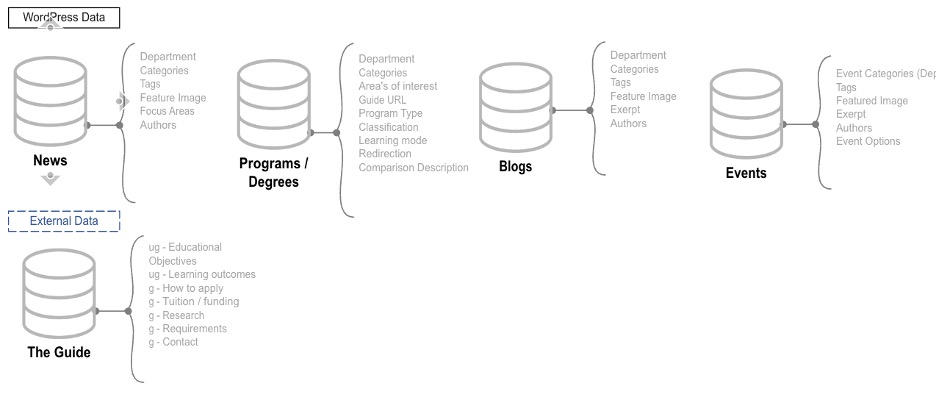
Site architecture
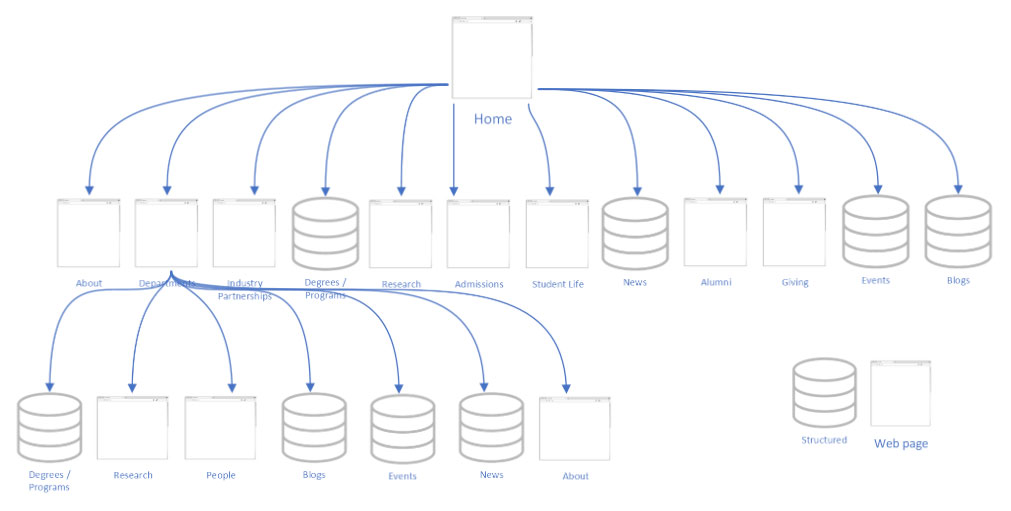
Future content types
Content types may be created and managed within the college or may come from the campus. For example, the website currently integrates content from The Guide through the use of a WordPress plugin. Several other content-type possibilities are identified below.
- Profiles (Faculty vita information)
- Student Profiles
- Careers
- In the media
- Facts & Stats
- Tuition
- Scholarships
- Centers
- Consortia
- Labs
- Institutes
- Publications
- CoE History
- Student Orgs
- Testimonials
- Grants / Funding
- Internships
- Research opportunities
- Affiliated people (board members)
Working with a content owner/manager model
Each content area of the website will have an owner and manager for the content. Defining the owner and managers within the college helps ensure the accuracy and relevancy of the information on our website. The responsibilities of each are described below:
This is an accordion element with a series of buttons that open and close related content panels.
Content owners
Content owners are responsible for the accuracy and relevance of the content on websites or sections of the website. The web content owner is generally a department chair or senior leader of various content areas.
Responsibilities:
- Assign a content manager for their website or section of content.
- Communicate website content needs to the content manager.
Content managers
Content managers are assigned to maintain web content for their department or content area. Content managers are set by the content owner in each department or area. The content manager generally works closely with department and senior leadership to understand their web needs and with the marketing team on how to accomplish them.
Responsibilities:
- Ensure content added to the website adheres to the four standards.
- Collaborate with the marketing team to develop a content strategy and maintenance plans.
- Create and edit the content within their web pages or web content areas.
- Monitor the accuracy and relevance of their website content.
- Use the college’s content management system to make edits and updates to their content.
- Alert the web operations manager of website issues beyond content changes or if significant changes are needed.
Content areas
All content must have an owner and manager to ensure the content meets the four web standards. When changes are requested outside of their content area the request will be routed to the content owner. A listing of content areas and ownership is available below.
- News
- Owner
Communications director (Renee Meiller) - Manager(s)
Science writers - Type
Database - Description
Major stories that demonstrate thought leadership and growth, support the brand, and support college priorities.
- Owner
- Events
- Owner
Marketing - Manager(s)
All WordPress managers - Type
Database - Description
Central location to showcase upcoming public events in the college. Examples include events for students, seminar series, and industry partner events.
- Owner
- Programs & Degrees
- Owner
Academic Planner & Data Analyst (Sara Hagen)
Marketing – For Degree comparison content - Manager(s)
Marketing - Type
Database - Description
A comprehensive list of the portfolio offered by the college.
- Owner
- Blog/post
- Owner
Marketing - Manager(s)
All WordPress managers - Type
Database - Description
Blog content is the most flexible communication channel on the website. As content grows, if content commonalities develop, the content may elevate to its own content type. Examples include student, faculty, and staff successes, awards, and other accolades.
- Owner
- Research – College level
- Owner
Associate Dean of Research (Oliver Schmitz) - Manager(s)
TBD - Type
Web page - Description
A high-level overview of the research focus areas along with two cross-cutting research themes. Each focus area contains sub-topics leading users to various departmental level focus areas.
- Owner
- Research – Department level
- Owner
Department Chairs - Manager(s)
Department content managers - Type
Web page - Description
Topic-based research areas allow for a more in-depth description of the research. This includes listing the faculty (core and affiliated) involved in each research area. In addition to faculty, the centers, consortia, and institutes supporting this research will be included.
- Owner
- Human resources (job postings)
- Owner
Assistant Dean for HR (Jason Jankoski) - Manager(s)
Department content managers - Type
Block level elements on the department home page - Description
It is used to highlight job opportunities specific to a department.
- Owner
- Industry Partnerships
- Owner
Director of corporate relations (Russ Johnson) - Manager(s)
TBD - Type
Web page - Description
It is used to highlight successful partnerships and cultivate new partnership opportunities.
- Owner
- Inclusion, Equity, and Diversity
- Owner
Associate Dean for inclusion, equity, and diversity (Chris Castro) - Manager(s)
Communication specialist (Kelsey Gockenbach) - Type
Web page - Description
Demonstrate how the college strives to affirm the backgrounds, lived experiences, abilities, and ideas of people from various races, cultures, countries, gender identities, sexual orientations, socioeconomic backgrounds, religious traditions, and more.
- Owner
- Giving
- Owner
Associate Dean for advancement (Cathleen Walters) - Manager(s)
Alumni relations manager (Cassandra Bocchieri) - Type
Web page - Description
Cultivate relationships with visitors interested in making a difference in the students’ lives through gifts to the UW-Madison College of Engineering and its departments.
- Owner
- Alumni
- Owner
Associate Dean for advancement (Cathleen Walters) - Manager(s)
Alumni relations manager (Cassandra Bocchieri) - Type
Web page - Description
Showcase how our engineering graduates make their mark on the world.
- Owner
- Admissions
- Owner
Associate Dean for academic affairs (Kathy Prem) - Manager(s)
UA comm & events manager academic affairs (Beth Johnson) - Type
Web page - Description
Encourage potential students to connect with the college through virtual or in-person information sessions and apply to the college.
- Owner
- Student life
- Owner
Associate Dean for academic affairs and Marketing (Kathy Prem)
Marketing - Manager(s)
UA comm & events manager academic affairs - Type
Web page - Description
It sets the tone of what going to UW-Madison is like and showcases the advantages of the student experience at the college.
- Owner
Quality assurance
To maintain the quality experience our users expect, marketing will continually improve templates, improve block elements, create new block elements, and further efficiencies within the college and across campus. As new features and styles are incorporated into the website, marketing will test functionality and visually inspect several high-impact pages on the site. These checkpoints are available in our testing plan.
Marketing provides automated reports on accessibility and quality assurance to content managers using SiteImprove to assist with maintaining the website’s quality. It is the responsibility of the content managers to maintain the standards of the website.
Marketing also manually monitors the site to ensure written and visual content continues to meet our user experience standards, presents a logical user experience, focuses on SEO, and meets the brand’s expectations.
On a technical note, all code modifications are documented through our git repo.
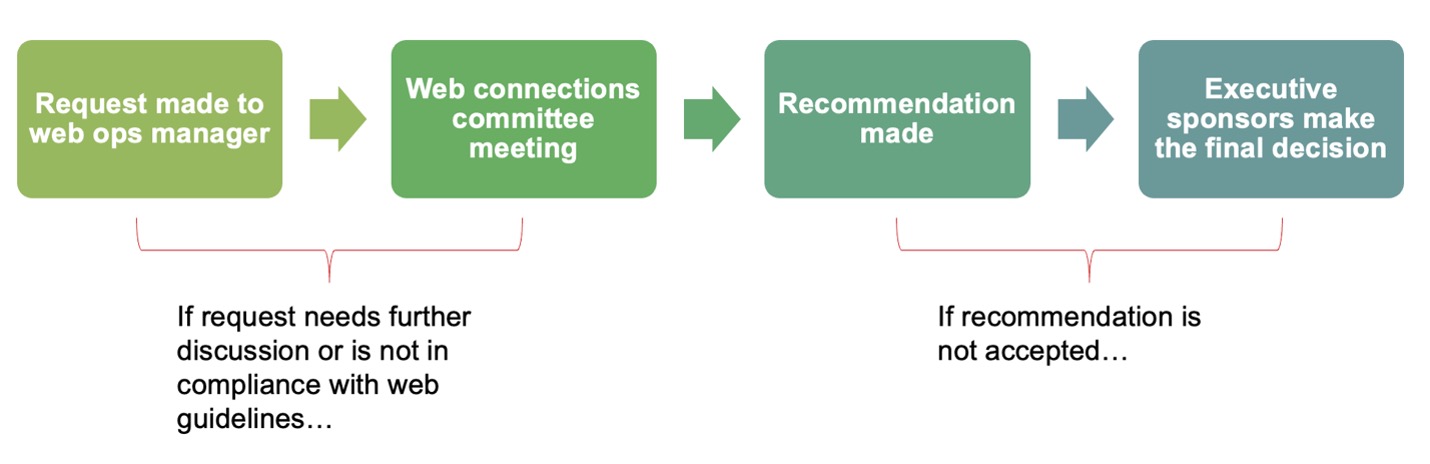
When the model doesn’t work
When content and ideas do not fall within the structures above marketing will work with the content managers to find solutions. The process is illustrated below.
Top-level pages
The marketing team has developed templates for level 1 and level 2 pages within the site. These are identified as high-value, highly-trafficked pages. Templates are created to communicate the brand identity and define the page’s visual hierarchy. Marketing continuously evaluates the effectiveness of templated pages through analytics and heatmaps for web pages. Mock-ups of several level 1 pages are created to help content managers visualize the components of the pages.
Template listing
- Homepage (HP)
- Department Home (DH)
- Department News (DN)
- Department Research (DR)
- COE News (N)
- COE News Detail (ND)
- Programs and Degrees Undergrad List (PDU)
- Programs & Degrees Graduate List (PDG)
- Programs & Degrees Undergraduate Detail
- Programs & Degrees Graduate Detail
- Program & Degree Comparison (PDC)
- Blog (BG)
- Blog Detail (BGD)
- CoE Events (CE)
- CoE Events Detail (CED)
Appendix
This is an accordion element with a series of buttons that open and close related content panels.
Glossary
Content Models
A content model formally represents content as a collection of content types, and their inter-relationships, and how it relates to the architecture of the website.
Content Area
Content in groupings of a similar category, or area of the website that may or may not have a definable structure. Examples of non-structured are Research, Alumni, Industry partnerships, Admissions, and Student life)
Content-Type
A content grouping in a database structure with taxonomies allows for management in a centralized reusable way. (News, Degrees, Blogs/posts, Events)
Structured Data
Data is organized into a formatted repository such as a database, CSV, or JSON file. The fields are discrete and its information may be retrieved either separately or with data from other fields in various combinations.
Post type / Custom Post Type
A post type is a collection of content, whereas a custom post type is a variation of content stored in the same table in the database.
Content Owner
Individuals are responsible for the accuracy and relevance of the content on websites for departments or groups. The web content owner is generally a department chair or senior leader of various content areas.
Content Manager
Employees are assigned to maintain web content for their department or content area. Content managers are set by the content owner in each department or area. The content manager generally works closely with department and senior leadership to understand their web needs.
Blog
Blog content consists of a featured image, date posted, author, copy, and classifications for sharing elsewhere within the site. It is the most flexible communication channel on the website. As content increases if commonalities across entries occur they may be elevated into their own custom post type.
Post
See blog, in WordPress blog entries are called posts.
User Journey
A person’s experience during one session of using a website or application, consisting of the series of actions performed to achieve a particular goal.
Student spotlight
A story highlighting the experience of a faculty/staff/student while at the college of engineering.
Announcement
A story or statement recognizing a faculty/staff/student as getting an achievement. Awards, grants.
Standards
Security Protocol
- If an account is inactive for 90 days, it may be shut off
Content
- All content must have an owner to ensure the content meets the four web standards. See the content model and site architecture.
- If the content has been determined as inappropriate for the target audience, outdated, inaccurate, or inconsistent with the brand, the marketing office will attempt to alert the appropriate content contributor or section head. If that step cannot be completed and the content is outdated, inaccurate, redundant, or trivial, marketing may remove it
- Changes can be made for clarity, grammar, spelling, usage, website best practices, accessibility compliance, and style and conform to university naming conventions and branding.
- Links to external sites open in a new window/tab.
- All content on the external site older than five years old may be archived.
- The content on the website is not to be used as an archive for past events, award winners, seminar series, and colloquiums. Historical data for this content is left for departments to manage internally.
- If an affiliated website has no content owner or has not been updated recently, marketing may not allow any linking to the site from engineering.wisc.edu.
Success Measurement
- All engineering.wisc.edu sites will have google analytics, to measure their effectiveness.
Site management
- Subsites wanting to use the engineering.wisc.edu domain will need approval from marketing.
Sources
Content modeling
- https://alistapart.com/article/content-modelling-a-master-skill/
- https://contentmarketinginstitute.com/2021/03/guarantee-perfect-content-model/
Governance
- https://moderncampus.com/blog/website-governance-best-practices.html
- https://pasadena.edu/strategic-communications-and-marketing/guides-and-reference/web-governance-policy/
- https://www.union.edu/communications/communications-policies/web-governance
- https://www.pnw.edu/marketing-communications/website/web-governance-policy/
- https://cals.cornell.edu/faculty-staff/marketing-communications/resources/website-guidance/web-governance
Style Guides